Thursday, December 18, 2025

Change mailbox language #Outlook #Exchange

 Exchange online had a bug for a couple of weeks, that many of our shared mailboxes came up english, despite that clients outlook is french, our lighthouse is french, the windows and local settings, server settings are all french. 

Probably even more mailboxes than the 5 we were treating, just users speaking proper English did not complain. We changed in many places the language, but it id not always or never get changed on client side. A weird behaviour from windows, that doing the same action over and over, back and forth can result in success. That is not true to life, as doing the same stuff over and over again, will have the exact same result.

So what you can do is run some commands in your WinKEY+Run window. Often outlook is so messed up, that you might want to run all of these. Some users, do not restart their old windows 10 laptop for 30days plus and they complain, outlook, onedrive, sharepoint, word and excel, nothing work. So yes, you might need to run all of these, to reset outlook and then, you can run the language changing powershell command. 

  • outlook.exe /resetfolders
  • outlook.exe /resetfoldernames
  • outlook.exe /resetnavpane
  • outlook.exe /cleanviews
  • outlook.exe /cleansharing
  • outlook.exe /manageprofiles
  • outlook.exe /safe
  • outlook.exe /resetaddins
  • outlook.exe /cleanpst
  • outlook.exe /cleansniff
  • outlook.exe /cleantaskbar
  • outlook.exe /rebuildsearch


You can go to new outlook and tick this box:

Screenshot of the OWA Settings page in which you have to change the language and date and time format. 

 You can try these powershell commands that most likely will work, after connecting to exchange online as admin of course:
So, it is my fault, as I was looking for outlook mailbox language everywhere. Including chatgpt and copilot too. One argument was always missing from my commands:

-LocalizeDefaultFolderName

I should have looked for outlook folder language or mailbox folder language. This is why when using chatgpt or copilot, you should always prompt full and precise information !

Powershell command:

Set-MailboxRegionalConfiguration -Identity user@domain.com -Language fr-FR -TimeZone "Romance Standard Time" -LocalizeDefaultFolderName

This is the command we started using the reset the language and it works like charm. There was one nasty folder that did not want to change and we used this command:

Set-MailboxRegionalConfiguration -Id jdupont -LocalizeDefaultFolderName:$true -Language fr-FR -DateFormat dd/MM/yyyy

The main difference is the $true at the end of -LocalizeDefaultFolderName.

Here you go, here is how you change folder language in outlook.  


Sunday, December 7, 2025

Windows EFS encryption - Why ?


This is a very advanced windows feature, that should be used with very careful consideration. If it was me, in a corporate environment I would definitely disable this option.

So if a user forgot the encryption key, specific windows features should be enabled in order to recover the files. Like admin recovery, or user backup key recovery, so with the help of his own session password he might be able to recover the files. If you chose to remove encryption from the user session, then often only the certificate gets removed, so nobody ever again can recover the files.  

 Disable it with GPO:


Serious Issue 

Why would this be problematic and when would this become a mess ? Here is a great example: A user encrypts a distant 'share folder'. He gives the folder password to 4 other users. Her encryption takes a long time to pass down, other users can still access the folder.

Now she calls the admin centre, that what she wants is special permissions for this specific user folder, files and subfolders. In a giant environment, I would not recommend breaking folder rights inheritance, but in small infrastructures, I did test with even triple inheritance breaking and it works ! In our case it is a 3rd level folder, so I simply broke inheritance, added the created user group, added the 4 users into the group, set rights to RWE. 
It worked, extremely bizarrely, for about 2hours. Then the user who encrypted the folder called me, that her colleagues cannot access the folder any-more.  1hour later she calls me again, the she cannot access the folder any more either. We could see from any session, even on the file server, those small yellow padlocks appearing on all files. 

She never mentioned that she encrypted the files on the first place. So, if she says this first, we simply decrypt them and off you go. But once, you changed, not only rights but inheritance on this shared folder, after encryption, nobody ever can touch those files. You can put it back to original rights state, nothing will happen. No more access.
We had VEEAM and windows history backup. "User Rights Backup" only of VEEAM doesn't work in this situations and comes back with an error. Windows history shows padlocked files till the day of the back up and even if backed up to the day with padlocks on, you still cannot decrypt the files, despite the original user rights. 

 If you don't have the knowledge of who did what, you can run these commands:

attrib "C:\path\to\folder"

cipher /c "C:\path\to\folder"

Right click on folder -> Properties -> General Tab -> Advanced -> Details 
You can see now who encrypted the folder. This is important for your documentation as to see, that it is not you messed up. 


Padlock on top right is encryption issue. Padlock on bottom left, is rights issue. Like classic windows, sharepoint or one drive issue. Padlock on the Status info, is share lock, sync lock or other issue. 

In this case, there is no point wasting time. She just confirmed her date of encryption, we recovered the whole folder. It was possible either with windows history or with VEEAM. 


I have found one website that states recovery possibilities:
https://tinyapps.org/docs/decrypt-efs-without-cert-backup.html 

Monday, November 24, 2025

Sharepoint sync and lock issues - solutions

 Sharepoint synced down to your PC by onedrive can have a ton of errors. It is caused by the simple dis-functionality of this badly thought out service but also by the fact that 10 people at one time can open one single document with various rights and do various actions on it. Imagine that one person wants to edit an excel rubric, while another wants to change it's colour and a third in the meantime tries renaming the document. In the meantime 5more users are having it open, some on the web some on their PCs. Few of them using a VPN from home, others are on the train wifi and some at work. Maybe also one user opens it up with excel 365, another with local office and the third with Power BI. I mean this shitshow has endless possibilities and something turning bad, is just normal. 

So, first of all make sure that you are not running some old windows 10 with no updates. Make sure you are at Win11 and all are updated. Second, run a full sfc /scannow and a full dism /online /cleanup-image /restorehealth

Before uninstalling, run these: %localappdata%\Microsoft\OneDrive\onedrive.exe /reset

C:\Program Files (x86)\Microsoft OneDrive\onedrive.exe /reset 

C:\Program Files\Microsoft OneDrive\onedrive.exe /reset 

wreset.exe

%localappdata%\Microsoft\OneDrive\settings 

delete this : PreSignInSettingsConfig.json 
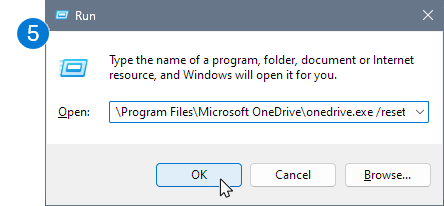
Run dialog command
Win+R= copy the command and run

 Then uninstall one drive. Run again the SFC and Dism commands. Check again for windows updates. Reboot your PC. Download the latest one drive version.

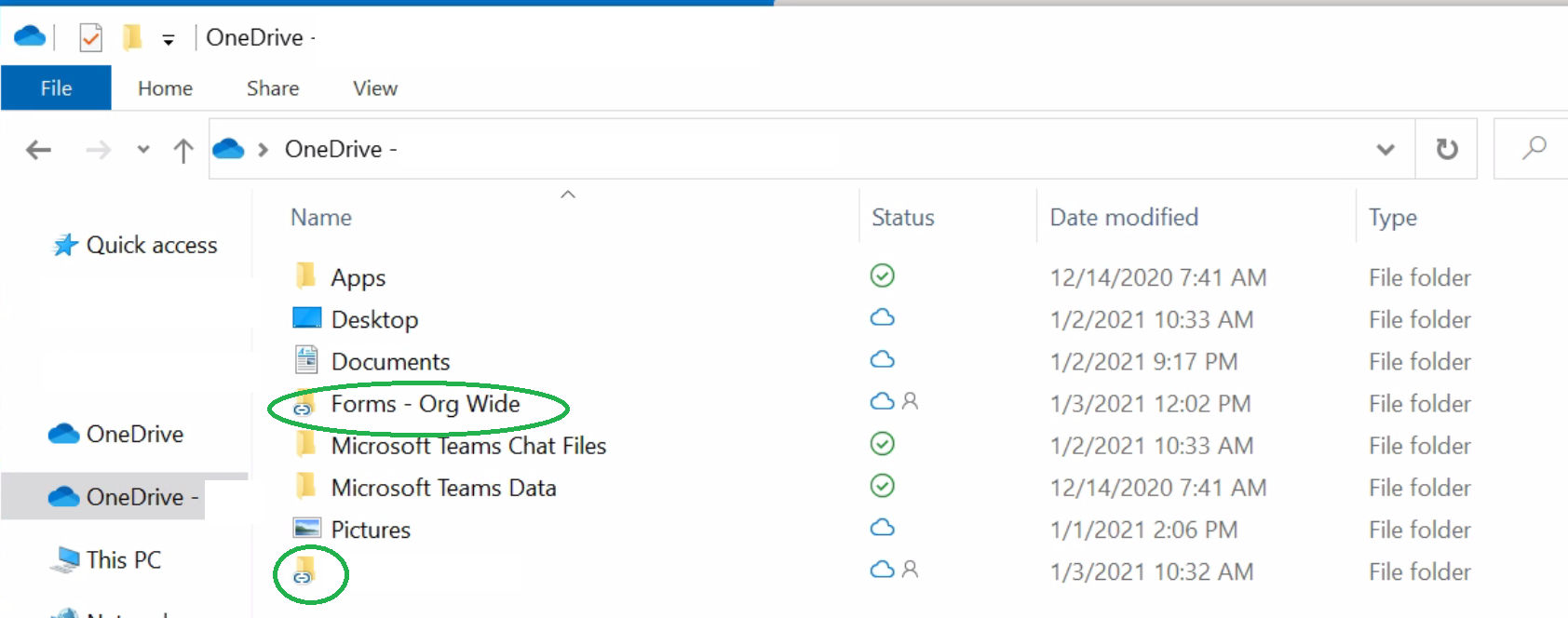
Before installing, go on one-drive online and make sure that there are no sharepoint links in your personal one drive. So actually often end users place Sharepoint shortcuts into their personal one drive, when for instance a company blocks direct syncing. It is blocked because the know issues of non uniform hardware and software and crappy internet connections. If I had a full on 8gig fibre going on for 30 employees, working only from the office, with latest PCs and latest OSes, like in New York, there would never be any issues.
So again, it is crucial that there are no sharepoint shortcuts in personal one drive. Not even in sub-folders.
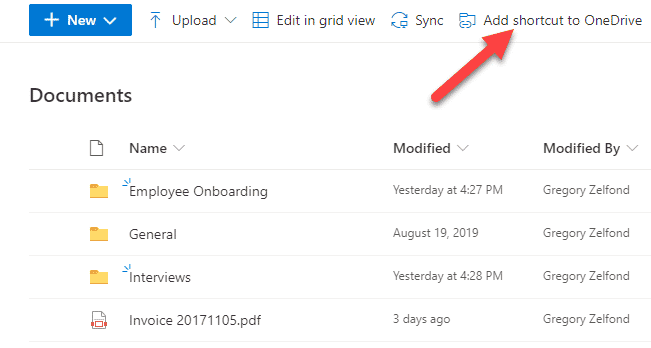
https://sharepointmaven.com/wp-content/uploads/2021/02/addshortcuttoonedrive2.png 

https://learn-attachment.microsoft.com/api/attachments/ff8b504b-09a4-447e-bc7b-9ff62cf676b4?platform=QnA
Example = don't do that !!!

So now you can install your one drive on your PC, add your account, go onto sharepoint and do a new share-point sync. Do not add shortcuts to your one drive. It will not only cause bugs and issues but poses security risks too. For instance, deleted files can end up in personal recycle bins. This can also happen on multiple ways. Accidentaly deleted files might not be recoverable and will disappear completely. Confidential files might end up in a the bin of all users who had the file open in the time of deletion. No one-drive shortcuts please ! 

Of course, if on sharepoint online, you cannot access a folder or a document, that is simply a right issues. In this case, you need to ask your sharepoint admin to give you the rights and place you into the security group accessing either as a member(RWE) or a visitor (RO).

It might happen, that you still won't get rid of the issue of sync and padlocks. Repeat the process but stop your antivius and open your firewall before installing and syncing. Also un-install your actual office and adobe reader !!! Very important !!! 
Adobe hates long file-names and also long folder paths. If you had pdf visualizing enabled in your file explorer through adobe, what is automatic after installation, it might lock files, sporadically. The thing is that it does not lock only PDFs but excel or word files too. Adobe also hates file-sharing and collaborative work ! So you might need to replace it with kofax or other sort of pdf handler. 

Sources:

https://support.microsoft.com/en-us/office/reset-onedrive-34701e00-bf7b-42db-b960-84905399050c#:~:text=Select%20Applications.,Clear%20data%20and%20Clear%20cache

https://support.microsoft.com/en-us/office/add-shortcuts-to-shared-folders-in-onedrive-d66b1347-99b7-4470-9360-ffc048d35a33

https://learn.microsoft.com/en-us/answers/questions/5380580/using-the-add-a-shortcut-to-onedrive-feature-in-a 



Friday, November 14, 2025

TIME SERVER IMPORTANCE - Harmony is key

Recently I came across a situation , where an RDS server started having random issues of services braking, random rebooting out of the blue and users getting disconnected. At the beginning of course we were thinking of a network issue, like the usual DHCP and DNS problems or bandwidth and network down problems. Of course the logs started showing otherwise. Running w32tm /query /configuration , w32tm /query /status , w32tm /query /source , w32tm /query /peers , we have found that the actual time server is set to be a non existent long time turned off machine. 

Time sync issues in worst case scenarios can cause the breakage of trust relationships, but mostly cause log-in issues, authentication problems not only for the users, but services and apps too. Scheduled tasks will break, especially if they were not local. 

Often time server details are propagated by a GPO or the default domain GPO. Normally the good practice is that the actual  main domain server (netdom query fsmo)gets it's time from a main continental time server like pool.ntp.org (redundancy: 0.pool.ntp.org, 1.pool.ntp.org), then it should propagate to secondary DCs and other servers. So if the main domain controller is out of sync from the european time server, the infrastructure would be still in sync and issues would not come up. The most important problems occur when certain sections of the infra are delayed by more than 5minutes. It is rare, but did my research and it can cause some serious issues, especially on hybrid infra structures running linux and ms based operations, on premises and cloud in the meantime. 

Our problem had risen from the fact that when server migration happened, they changed the server name and address. However I think it wasn't a service migration, but a hard VM to VM copy. Except that the main domain default GPO stayed as it was. Still set up for the old non existent time server. 

At this moment, we did a risky practice, we edited the default GPO, then did a gpupdate /force on the 3 other servers. Would I have done the same if I had 80 servers ? Not sure !!!
Our idea worked. So I think, that it would work also for a big infra, except that maybe on the way of propagation, something would break and would need fixing. That is not an issue, as backups and snapshots are present. But, it should be done like during the general yearly downtime or during a 3 days long weekend.

Better Practice 

Main Domain Policy GPOs have N°2 priority so setting a GPO above with N°1 priority is a more sustainable and secure practice.

First need to make sure that the PDC s time server has been set right:

w32tm /config /manualpeerlist:"fr.pool.ntp.org" /syncfromflags:manual /reliable:yes /update
w32tm /resync /force
 

Right-click the domain name → Create a new GPO
Example: "Time Configuration – All Computers"

Edit the GPO → Computer Configuration → Policies → Administrative Templates → System → Windows Time Service → Time Providers
Configure

  • Enable Windows NTP Client
  • Type: NT5DS
  • NtpServer: leave empty (clients follow DCs)
  • Link the GPO at the domain level (top-level link)
  • This applies to all computers and servers in the domain
 Then you must either wait 15 to 30min or run a gpupdate /force and maybe a w32tm /resync on each server.  Than you can check your results with w32tm /query /source or w32tm /query /status.

(Please note that in some cases DCs are stubborn, so while your new time server might propagate down to everything including all servers and PCs, DCs would still not be updated. In this case you simply need to create another GPO applied to the Domain Controllers OU ! ) 

Tuesday, August 5, 2025

Create a CUPS / Linux Print Server

 # Download debian net inst ISO
https://cdimage.debian.org/debian-cd/current/amd64/iso-cd/debian-12.11.0-amd64-netinst.iso

# Create a bootable USB stick
```bash
sudo dd if=debian-12.11.0-amd64-netinst.iso of=/dev/sda bs=4M status=progress oflag=sync
```

# Update 
```bash
sudo apt update -y && sudo apt upgrade -y && sudo apt autoremove -y
```
# Install Printing Service
```bash
sudo apt install cups
sudo apt install avahi-daemon
sudo systemctl enable --now avahi-daemon
sudo ufw allow 631 # if using ufw
```

## Cups
Cups is accessible from your browser:
http://localhost:631

**Add admin access**
```bash
sudo nano /etc/cups/cupsd.conf
------------------------------
# Listen on all interfaces
Port 631
Listen 0.0.0.0:631
ServerAlias *

# Enable printer discovery on the local network
Browsing On
BrowseLocalProtocols dnssd

# Access control for general browsing/printing
<Location />
  Order allow,deny
  Allow @LOCAL
</Location>

# Access control for the admin pages
<Location /admin>
  Order allow,deny
  Allow @LOCAL
</Location>

# Access control for the admin operations (adding/removing printers)
# <Location /admin/conf>
#  AuthType Default
#  Require user @SYSTEM
#  Order allow,deny
#  Allow @LOCAL
# </Location>


------------------------------
sudo systemctl restart cups
```
**For usb printers, we might need two print tools**
```bash
sudo apt install printer-driver-gutenprint foomatic-db
# we can install ssh access too
sudo apt install openssh-server
# On both client and server
sudo systemctl restart cups
sudo systemctl restart avahi-daemon
```

## Install Printer Driver if needed
*I am using an old usb printer Brother L2310D*
*This is the main reason for my print server*
*My new box, cannot handle task forwarding on it, like the old Freebox*

https://support.brother.com/g/b/downloadlist.aspx?c=eu_ot&lang=en&prod=hll2310d_us_eu_as&os=128#SelectLanguageType-10283_0_1
*By clicking on the driver, all the instructions are there.*
*Normally we don't need to do this*

```bash
# This can work too
sudo apt install printer-driver-brlaser
```

# PCs that want to print need to have these installed 
*normally it is the case for ubuntu / debian / fedora*
```bash
sudo apt install cups avahi-daemon printer-driver-brlaser
sudo systemctl enable --now cups
sudo systemctl enable --now avahi-daemon
```

Finally you also have to make sure that your PC is not simply looking for a printer on another PC, because this will cause printer confusion. It should look for a print server, so the printing data will be comprehensible when it arrives to the printer. Normally on windows I especially for a network printer I would use a specific driver on the server and generic drivers on the clients. Often in Linux this is not possible, because the generic driver installs come back with an error. 

```bash
sudo nano /etc/cups/client.conf
----------

ServerName 192.168.1.83     # your printserver IP

```

So now, normally, when you simply do a printer search your PC should auto detect the printer. 
Normally, even windows devices would be dtecting it. 
If not, just add printer and try using IPP.
If not, use the TCP/IP section and add your servers IP.


Friday, June 27, 2025

Install Linux on latest DELL laptops - I9 185h / 285h - Part 2

 Even if it is not about some real professional stuff, I already have posted this article on linkedin.

I have tried and tested every single option proposed by chatgpt, perplexity, deepseek, dell website, youtube, reddit, dell forums, laptop forums and the linux did not want to go up. I did the latest 1.15 bios update too a couple of days ago. I was on the verge of uploading a custom BIOS and probably doing irreversible damage to my PC, but Windows was driving me crazy. When you turn off your PC and it does 1hour of updates before you can close the lid, then doing the same when opening up, is just nuts. When your base memory is 5gigs, you don't do anything come back in an hour and it is 12 ? When running a VM and you have only 2 gigs of memory left ? When looking for a setting and windows property search is not indexing it ? I mean it is just endless pain in the back. You open your PC and want to work right away. When want to install, update, customize, download, launch, I don't want to think about that stuff. Just do it and if it does not work, I find another solution in seconds. Like I downloaded yesterday onto my linux an apt based keepass2 and it was buggy. I did the same with keepassXC and was perfect. Uninstalled keepass2. IT took me like 1min thirty. In win11 just to go to the website and download and install would take way more.
My new linux distro was also up in under 7minutes ! Windows still takes nearly an hour if installed from zero ! Anyways, just to show you how awesomely relieved I am that my win is off and my kubuntu is up !

------------------------------------------------

I tried at least 6 linux distros, custom kernels, custom drivers for intel and dell. It still did not went up. Normally, without messing around, a simple solution of secure boot off, disk management from RAID to AHCI swtich and a linux should go up on any PC. Intel, AMD, ARM what ever. No it did not ! 

We talk about a brand new PC Dell 14 Plus 7440 32gb lpddrx Intel I9 185h. The PC was produced this april 2025 ! When I went to the reddit forums, I found a lot of issues and complaints about these new intel Dell laptops. Especially the GEN1 GEN2 I7 I9 ones ! 13th and 14th gen I5 I7 I9s have no real issues nowhere and they are well supported by LTS distros too. 

So what was my problem  ?


 This is an SKHYNIX branded bloody expensive dell NVME. It costs 188€ on DELLs website. IT comes with a long heatsink, but the actual thermal sponge is glued to the dell sticker. Not sure what a BPA coated paper can do in case of heat transfer. Very funny ! Anyways, my laptop was having this as the original NVME. The original price of my laptop was 1299€ and with some discount it was sold for 999€. I also had some extra codes and DELL points so I paid 889€. If we followed the price tag of this SKHynix NVME and the price tag of Windows, I could have gotten this PC for under 600€ and by my own NVME.

This is what I did. I actually just bought a 990 Pro from Samsung, as this is the most reputable NVME on the current and past market. I have  an old 970 EVO in AMD PC and it runs like a Nordictrack treadmill. 

I installed it and there was no bios lag on recognizing it ! My windows install did not need extra RST driver load to recognize the NVME ! One point to that ! I did this just to test my theory !
I made a Kubuntu 25 USB with balena etcher, what has also actually failed on both of my Windows machines, so I went downstairs, onto my linux tower and burnt it on that one !

Guess what. I took 6minutes and 45 seconds to install Kubuntu on my new laptop, with absolutely zero hiccups ! No questions, no issues, no nothing !  
Since last night, I am relieved, that my laptop is blazing fast, with less heat, half the memory use, half the space use for the os and components, 1/50th of update and upgrade times and much more ! 

Thank you linux and thank you DELL !


PS.: I also recently purchased a replacement laptop for my wife. A Dell 16" Inspirion with Ryzen 7 8840. I turned simply off secureboot and the Kubuntu went up in even faster time than on the Intel ! Strangely from a less powerful PC with less and slower memory !

Sunday, June 22, 2025

Install Linux on latest DELL laptops - I9 185h / 285h

Installing Linux is a pain in the back on these new machines. Here is what can prevent you from doing so and how to correct it. I am using a DELL Inspirion 14 Plus with I9 185H.

  • Sata Mode
  • Secure Boot
  • Microsoft UEFI Certificate Authority
  • TPM 
  • SMM
  • WSMT

SMM and WSMT are both, features that you might find in BIOS. Often one or the other. Unless you custom load BIOS settings from skratch, or flash on total custom BIOS, these settings are not changeable. They also might prevent you from installing Linux, but newer Kernels support these. "Normally".

It is time consuming, but if it was me, to keep most of the possible security features on, I would start changing these settings one by one.

Step 1
Download Dell Command Configure

Step 2 - try it without at the beginning
Set BIOS admin password. You might need it, to accept changes. I simply would use either 4 digit pin or a a max 6character password for home users. For a pro environment I would definitely go with a classic 12 character, number, upper and lower case, Special Character option. Be careful with keyboard setup !

Step 3
Run Dell Command Configure Prompt. Start with setting your sata controller from Raid using Intel RST, to AHCI. Then try installing your linux distro. This is the most usual cause of Linux not going up on your new DELL Laptop.

Step 4
Ubtuntu, Fedora, Mint, but even Debian supports secure boot. Normally ! If it still is messing up your install: Turn off secure boot. This one can be done from BIOS itself. 

Step 5
Disable Windows UEFI Cert - Well, it might be necessary and most possibly just in case something went wrong, you won't be able to secure boot your deice, if you installed linux with these two features off. 

Summary of Commands

Add this before your commands, if you've set password:
cctk --valsetuppwd=MyBiosPass123

Your commands should look like that:

cctk --valsetuppwd=MyBiosPass123 --embsatara=ahci
cctk --valsetuppwd=MyBiosPass123 --secureboot=disable


SATA Mode → AHCI    cctk --embsatara=ahci
Disable Secure Boot   
cctk --secureboot=disable
Disable MS UEFI Cert   
cctk --securebootmode=custom
cctk --deletepk
Disable TPM   
cctk --tpm=off
Clear TPM   
cctk --tpmclear
Disable SMM / WSMT   
cctk --smmsecuritymitigation=disable

At the moment of this article, I could disable everything I wanted. I did not find a way to disable security mitigation, without doing a drastic action on my BIOS. I will come back to see, if a new linux distro will go up flawlessly or not. I just have ordered a new 2TO 990pro from Samsung. I hope for the best, cause I can't get the use of Windows anymore....

Please note that Dell Command Configure is available on Linux. Except, that it also has a GUI interface on Windows and there are many many options that will be denied if you did not use that. Setting RAID sata mode to AHCI is straight forward, but all other functions might fail !
Why not just go with a R9 AI PC instead of Intel ? If you wanted to focus on virtualization projects, running multiple low level systems, you need a lot of cores. But we talked about a laptop, so when you need to run low level stuff, your battery life could be still excellent ! No thunderbolt port on AMD pcs  ! The new thunderbolt 5 can run 3 4K monitors at 144hz, while charging and having internet, headset, keyboard and mouse all plugged into one single dock ! Finallyggt now, DELL has limited options on R9 pcs not coming with LPDDR5 and without PRO feature ! Why Dell ? Cause I need physical quality and I have been seeing Lenovo, HP, Terra breaking like pretzels.


Change mailbox language #Outlook #Exchange

 Exchange online had a bug for a couple of weeks, that many of our shared mailboxes came up english, despite that clients outlook is french,...