
Sharepoint synced down to your PC by onedrive can have a ton of errors. It is caused by the simple dis-functionality of this badly thought out service but also by the fact that 10 people at one time can open one single document with various rights and do various actions on it. Imagine that one person wants to edit an excel rubric, while another wants to change it's colour and a third in the meantime tries renaming the document. In the meantime 5more users are having it open, some on the web some on their PCs. Few of them using a VPN from home, others are on the train wifi and some at work. Maybe also one user opens it up with excel 365, another with local office and the third with Power BI. I mean this shitshow has endless possibilities and something turning bad, is just normal.
So, first of all make sure that you are not running some old windows 10 with no updates. Make sure you are at Win11 and all are updated. Second, run a full sfc /scannow and a full dism /online /cleanup-image /restorehealth.
Before uninstalling, run these: %localappdata%\Microsoft\OneDrive\onedrive.exe /reset
C:\Program Files (x86)\Microsoft OneDrive\onedrive.exe /reset
C:\Program Files\Microsoft OneDrive\onedrive.exe /reset
wreset.exe
%localappdata%\Microsoft\OneDrive\settings
delete this : PreSignInSettingsConfig.json
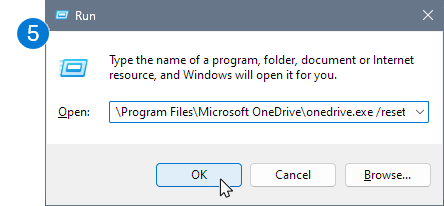 |
| Win+R= copy the command and run |
Then uninstall one drive. Run again the SFC and Dism commands. Check again for windows updates. Reboot your PC. Download the latest one drive version.
Before installing, go on one-drive online and make sure that there are no sharepoint links in your personal one drive. So actually often end users place Sharepoint shortcuts into their personal one drive, when for instance a company blocks direct syncing. It is blocked because the know issues of non uniform hardware and software and crappy internet connections. If I had a full on 8gig fibre going on for 30 employees, working only from the office, with latest PCs and latest OSes, like in New York, there would never be any issues.
So again, it is crucial that there are no sharepoint shortcuts in personal one drive. Not even in sub-folders.
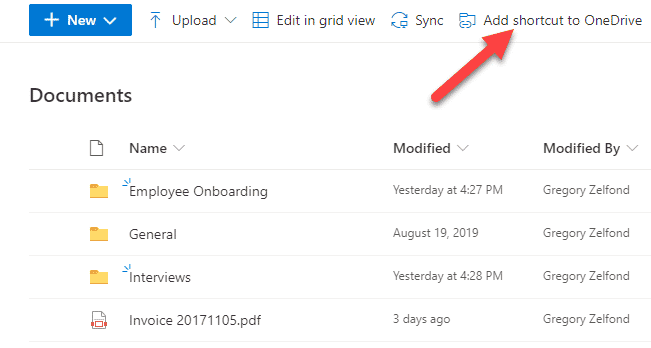
| Example = don't do that !!! |
So now you can install your one drive on your PC, add your account, go onto sharepoint and do a new share-point sync. Do not add shortcuts to your one drive. It will not only cause bugs and issues but poses security risks too. For instance, deleted files can end up in personal recycle bins. This can also happen on multiple ways. Accidentaly deleted files might not be recoverable and will disappear completely. Confidential files might end up in a the bin of all users who had the file open in the time of deletion. No one-drive shortcuts please !
Of course, if on sharepoint online, you cannot access a folder or a document, that is simply a right issues. In this case, you need to ask your sharepoint admin to give you the rights and place you into the security group accessing either as a member(RWE) or a visitor (RO).
It might happen, that you still won't get rid of the issue of sync and padlocks. Repeat the process but stop your antivius and open your firewall before installing and syncing. Also un-install your actual office and adobe reader !!! Very important !!!
Adobe hates long file-names and also long folder paths. If you had pdf visualizing enabled in your file explorer through adobe, what is automatic after installation, it might lock files, sporadically. The thing is that it does not lock only PDFs but excel or word files too. Adobe also hates file-sharing and collaborative work ! So you might need to replace it with kofax or other sort of pdf handler.
Sources:
https://support.microsoft.com/en-us/office/reset-onedrive-34701e00-bf7b-42db-b960-84905399050c#:~:text=Select%20Applications.,Clear%20data%20and%20Clear%20cache
https://support.microsoft.com/en-us/office/add-shortcuts-to-shared-folders-in-onedrive-d66b1347-99b7-4470-9360-ffc048d35a33
https://learn.microsoft.com/en-us/answers/questions/5380580/using-the-add-a-shortcut-to-onedrive-feature-in-a


